Tuesday, November 29, 2011

i9003XXKPQ 2.3.6 Gingerbread Firmware

This is the latest Firmware of Samsung i9003 Galaxy Sl and other dev's focus here for its development..
You will be instructed by this page for you to have this firmware without using your kies..

Requirements:
i9003XXKPE Firmware - clickhere
i9003XXKPQ Firmware - clickhere
password: sampro.pl


GUIDE:

1. Firstly, Download the 2.3.5 firmware from Przekret's thread
2. Run Odin3 v1.83
3. Set your phone to download mode : Press Volume down + OK first, then hold Power button.
4. Connect your phone, you should see Odin shows your phone is Added with COM number.
5. Click PIT button and select this file: latona_20110114.pit
6. You should see Re-Partition, Auto Reboot and F. Reset Time checked.
7. Click PDA button and select this file: CODE_I9003XXKPE_CL409735_REV08_user_low_ship.tar
8. Click PHONE button and select this file: MODEM_I9003XXKPE_REV_00_CL1041909.tar
9. Click BOOTLOADER button and select this file: APBOOT_I9003XXKPE_CL409735_REV08_user_low_ship.tar
10. Click CSC button and select this file: GT-I9003-CSC-MULTI-OXAKPE.tar
11. Click Start button to flash these files to phone.
12. Do not touch anything till you see PASS on the program window.
13. Turn off the phone and set it back into download mode once you get an initial first boot to homescreen. Do not set up anything, Just power off and set to download mode.
Note: You only need to flash once to XXKPE before proceeding to XXKPQ
14. In Odin, press Reset button. Re-partition should be unchecked automatically.
15. Select file I9003XXKPQ_I9003XXKPQ_I9003SERKPQ_HOME.tar as PDA
16. Click on Start to flash XXKPQ PDA to phone
17. Once you have flashed, after the phone started up, press *#1234# and check your PDA,Phone and CSC, everything should ended with KPQ
18. Factory reset and enjoy

i9003XXKPM 2.3.5 Gingerbread Firmware Update 10/201111

This is the instruction on How you can update your Samsung i9003 Galaxy SL firmware to XXKPM 2.3.5 Gingerbread..

requirements:
i9003XXKPE 2.3.4 Gingerbread Firmware - clickhere
i9003XXKPM 2.3.5 Gingerbread Firmware - clickhere
password: samfirmware.com

Note: XXKPM can only be flashed with help from it's supporting predecessor XXKPE like the XXKPH series, So make sure you have XXKPE downloaded. User flashing version varies with this, but this is my successful 100% assured boot.
1. Firstly, Download the XXKPE and XXKPM Firmware
2. Run Odin3 v1.83
3. Set your phone to download mode : Press Volume down + OK first, then hold Power button.
4. Connect your phone, you should see Odin shows your phone is Added with COM number.
5. Click PIT button and select this file: latona_20110114.pit
6. You should see Re-Partition, Auto Reboot and F. Reset Time checked.
7. Click PDA button and select this file: CODE_I9003XXKPE_CL409735_REV08_user_low_ship.tar
8. Click PHONE button and select this file: MODEM_I9003XXKPE_REV_00_CL1041909.tar
9. Click BOOTLOADER button and select this file: APBOOT_I9003XXKPE_CL409735_REV08_user_low_ship.tar
10. Click CSC button and select this file: GT-I9003-CSC-MULTI-OXAKPE.tar
11. Click Start button to flash these files to phone.
12. Do not touch anything till you see PASS on the program window.
13. Turn off the phone and set it back into download mode once you get an initial first boot to homescreen. Do not set up anything, Just power off and set to download mode.
Note: You only need to flash once to XXKPE before proceeding to XXKPM
14. In Odin, press Reset button. Re-partition should be unchecked automatically.
15. Select file I9003XXKPM_I9003XXKPM_I9003SERKPM_HOME.tar.md5 as PDA
16. Click on Start to flash XXKPM PDA to phone
17. Once you have flashed, after the phone started up, press *#1234# and check your PDA,Phone and CSC, everything should ended with KPM
18. Factory reset and enjoy

i9003DXKP9 Firmware 2.3.5 10/28/2011

This Firmware is been release thru Samsung kies in Southeast Asia...
but if your kies can't detect this update we can have it, by flashing thru Odin.. :) this is includes the turorial on how you can flash from other firmware to this DXKP9 2.3.5 Gingerbread firmware.. :)

requirements:
DXKF1 froyo Firmware- clickhere
DXKP9 Gingerbread Firmware- clickhere
password is : samfirmware.com


You will need 1st to download the DXKF1 Froyo firmware.. why? because this firmware contains the complete files of asian firmware.. that is Bootloader, PDA, Phone, and CSC.. from this we can have a clean Flash of Asian firmware.. :)
Then download the DXKP9 Gingerbread Firmware, you will see that this firmware contains only 1 file that we will be needing soon as the flashing goes by..

then here is the guide..

Guide:

1. Flash DXKF1 (download & extract files first) using ODIN:
- Open ODIN check Re-Partition, Auto Reboot, F.Reset Time
- Click PIT button choose: latona_20110114.pit
- Shutdown phone
- Simultaneously click and hold Vol.Down+Home+Power buttons (Download Mode)
- Connect phone to PC via Data Cable. (make sure ID:COM box in Odin highlighted yellow)
- Click ODIN's Start button
- Wait for "PASS!" to appear on top left corner of ODIN
- After PASS! click reset button (Re-Partition should be unchecked)
- Click PDA button and choose: I9003DXKF1-REV08-ALL-low-CL1020446.tar.md5
- Click PHONE button and choose: MODEM_I9003DXKB2_REV_00_CL863799.tar.md5
- Click CSC button and choose: GT-I9003-CSC-MULTI-OLBKB2.tar.md5
- Click Start and wait for "PASS!"


2. After reboot do not setup just shutdown and enter Download Mode.


3. Flash DXKP9 as PDA through ODIN:
- Open ODIN
- Click PDA button and choose: I9003DXKP9_I9003OLBKP7_I9003DXKP7_HOME.tar.md5
- Conect phone to PC via Data Cable (make sure ID:COM box in Odin highlighted yellow)
- Click Start button and wait for "PASS!"
4. After reboot, shutdown
5. Simultaneously click and hold Vol.Up+Home+Power buttons to enter Recovery Mode
6. Using volume buttons choose "wipe cache partition" and pres Home button
7. Choose "wipe data/factory reset" and press Home button
8. Choose "reboot system now" and press Home button to Reboot the phone
9. Complete phone setup dialogue, and test everything: Wifi,2G,3G,Mail Notification,GPS.
10. DONE!!

Congratulations!!

Thursday, October 20, 2011

IRIS

       -is a "SIRI" application for Android.

The voice control is now been part of Android development. Siri is now breaking the fun with its superior search and capabilities. However the team from dexetra.com build a Siri like application for android.
Its called "IRIS". Iris also allows you to search on various topics, the translations of works of art, history and more. Now we ask, "What is the fish?" And he answers in the article Wikipedia focusing our finned friends.
This app will soon be available in the market, but I recently found and tested this, but its pretty cool. Android uses text-to-speech features is meant the application of fundamental issues and Narayan and his friends, all the better time.
The coolest is? Hours of eight finish in app.

                                              if you want to try it you can download the apk here.

Tuesday, October 18, 2011

Gingerbread 2.3.5 XXKPM Firmware for i9003 SL

Gingerbread 2.3.5 XXKPM Firmware for Samsung i9003 galaxy SL released..
Thank you samfirmware.com for this update!

XXKPM FIRMWARE DOWNLOAD
password: samfirmware.com

Installation guide:
1st Flash XXKPE Firmware via odin
2nd put XXKPM file to PDA in odin then flash

note: pls do a factory reset in every firmware flashed.. :)
happy flashing to all!

Thursday, October 6, 2011

Nexus Prime Specs (initial)


Initial Specs of Nexus Prime

-Fast dual Core Processor clocked with 1.5ghz
-Powerful dual-core GPU, PowerVR SGX543MP2
-8-megapixel with full 1080p HD video-shooting camera
-expect a 2050mAh battery
-dual-mode GSM/CDMA radio
-head-turning 4.65-inch Screen
-1280x720 pixels screen
- October 11, public viewing

Word has it that the next superphone which runs on Google’s Android operating system would ne the Nexus Prime – and what’s so great about it? How about this for starters – the Nexus Prime will run on the next version of the Android operating system, currently dubbed as Ice Cream Sandwich. It seems that the Nexus Prime is set to arrive this coming October 11th, where it will come with a 4.65″ Super AMOLED display to keep your eyes extremely happy, what with a resolution of 1,280 x 720 pixels. Not only that, the 1.5GHz dual core processor would also do its bit to make sure everything runs as smoothly as possible without any dropped framerates or slowdown in the user interface.


Apart from that, it has been alleged that the Nexus Prime will carry LTE connectivity – now that would certainly place it on par with many of the newer Android-powered smartphones that have been launched in the past year. One thing’s for sure, to have Google’s Nexus Prime and Apple’s iPhone 5 go toe-to-toe this coming Halloween season would be an epic battle.

Wednesday, October 5, 2011

Samsung i9003 Galaxy SL Full Specs

I thought its only a dream to have a not really expensive but a mid end Phone like this. But with the creator of the Samsung i9003 Galaxy SL it is not possible to have it, because i think this is  an Android Budget Phone for the Mid 2011.
Im really excited for the previous month when I started planning to buy this phone, because this is be my 1st Touch Phone to own.
And Now i have it And very much Happy to use it.


This is the Full Specification of this Phone from gsmarena

General           2G NetworkGSM 850 / 900 / 1800 / 1900
3G NetworkHSDPA 900 / 1900 / 2100
Announced2011, February
StatusAvailable. Released 2011, February
Size                 Dimensions123.7 x 64.2 x 10.6 mm
Weight131 g
Display           TypeSC-LCD capacitive touchscreen, 16M colors
Size480 x 800 pixels, 4.0 inches (~233 ppi pixel density)
- Gorilla Glass display
- TouchWiz 3.0 UI
- Multi-touch input method
- Accelerometer sensor for UI auto-rotate
- Touch-sensitive controls
- Proximity sensor for auto turn-off
Sound              Alert typesVibration; MP3, WAV ringtones
Loudspeaker Yes
3.5mm jack Yes
Memory          PhonebookPractically unlimited entries and fields, Photocall
Call recordsPractically unlimited
Internal4GB/16GB storage, 478 MB RAM user available
Card slotmicroSD, up to 32GB, buy memory
DatA               GPRSClass 12 (4+1/3+2/2+3/1+4 slots), 32 - 48 kbps
EDGEClass 12
3GHSDPA, 7.2 Mbps; HSUPA, 5.76 Mbps
WLANWi-Fi 802.11 b/g/n, DLNA, Wi-Fi hotspot
BluetoothYes, v3.0 with A2DP
Infrared portNo
USBYes, v2.0 microUSB
CamerA          Primary5 MP, 2592 x 1944 pixels, autofocus
FeaturesGeo-tagging, touch focus, face and smile detection
VideoYes, 720p@30fps
SecondaryYes, VGA
Features         OSAndroid OS, v2.2 (Froyo), upgradable to v2.3
CPU1GHz Cortex A8 CPU, PowerVR SGX530 GPU, TI OMAP 3630 chipset
MessagingSMS(threaded view), MMS, Email, Push Mail, IM, RSS
BrowserHTML
RadioFM radio with RDS
GamesYes
ColorsBlack, white
GPSYes, with A-GPS support
JavaYes, via Java MIDP emulator
- Social networking integration
- Digital compass
- MP4/DivX/WMV/H.264/H.263 player
- MP3/WAV/eAAC+/AC3/FLAC player
- Organizer
- Image/video editor
- Document editor (Word, Excel, PowerPoint, PDF)
- Google Search, Maps, Gmail,
YouTube, Calendar, Google Talk, Picasa integration
- Adobe Flash 10.1 support
- Voice memo/dial/commands
- Predictive text input (Swype)
Battery             Standard battery, Li-Ion 1650 mAh
Stand-byUp to 610 h (2G) / Up to 550 h (3G)
Talk timeUp to 15 h (2G) / Up to 7 h 30 min (3G)

How to Update Samsung i9003 Galaxy SL to Gingerbread

There are only two regions for now who can update Samsung i9003 Galaxy SL to Gingerbread via Kies its only Europe and Russia but with the help of some other virtual friends and some blog like this its now been pass thru some people who has knowledge in Android Flashing.. I am not good in flashing and actually it is my 1st time to have a Android Phone as i said earlier...

Just a tip for a newbie like me:
1. Please be sure of what you are doing.
2. Read Instruction carefully
3. If you dont sure what you're doing, please dont hesitate to ask to some experience person.
4. Please be guided of the Instruction always.
5. And Lastly if you failed to do so, do not hesitate to go to Service Center near you.. :)

Disclaimer: I am not responsible when you brick your device. just want to help you and share my experience with you.

Lets Start:

You will need:
      *A Computer (Laptop/Personal Computer) with Windows Operating System
      *A Samsung i9003 Galaxy SL
      *A mini USB cord (its in the box of your phone)
      *And a strong heart :)

1st you will need to download a Firmware for Samsung i9003 Galaxy SL to samfirmware
you will need to make an account for you to download an exact firmware for our phone.
then put your cursor to the TOOLBOX > FIRMWARE > FW ANDROID > then look for our phone below.
This is the exact picture of the firmwares that we have:
You can see that we have 2.2.1 and 2.3.4.

The 2.2.1 is an Froyo Firmware and the 2.3.4 is an Gingerbread Firmware.
You will need to download only 1 firmware and the most usable firmware that we have now is the XXKPH but you will need to flash the XXKPE twice before you can Flash XXKPH because of some bugs.
Now if you download the XXKPE firmware and extract it you will see odin.exe file inside the folder.
open it and you will saw this:
1st you will need to hold your phone and go to download mode:
just turn off your phone and 
*press volume down + home button and follow the powerbutton and wait for android downloadmode to pop out on the phone screen.
*And now get the micro USB and plug it to your phone and to your computer.
*the odin must recognize your phone
*then click repartition
*then click PIT
*look for latona_20110114.pit on the folder of XXKPE.
*the flash
*if done pls pull the USB and your Battery off, 
*then Put the Battery Back
*And Go to download mode Again
*back to odin pls click reset

Now its time to Flash to XXKPE pls put the items Accordingly.
*Click PDA button and select PDA file: example: I9003xxxxx-xxx...-PDA-low-CL890053.tar.md5 
*Click PHONE button and select MODEM file: example MODEM_I9003xxxxx_REV_00_CL889972.tar.md5
*Click CSC button and select CSC file: example: GT-I9003-CSC-xxxxxx.tar.md5 

*Then Flash wait until you see "PASS" on the odin
*Then Just do a factory reset after flash.
this is how to factory reset *2767*3855# type it on the dialer tab

As I said we need to Flash XXKPE Twice so that we wont encounter any bugs
*pls repeat the Flashing
*then do a factory reset again.

Congratulations!!! you now have a Gingerbread ROM!

How to ROOT Samsung i9003 Galaxy SL

HDisclaimer: if you root your phone, you will also void your warranty.

There are several process and application to root your phone, it is depends on the firmware and application that you have.. In rooting your phone there will be no damaged that you may encounter with your phone and firmware but it is only 99.99% safe.. if you got the 0.01% luck, just prepare for a reflash..

Rooting for all 2.2.1 FROYO Firmware:
you will need:
Superoneclick of latest version
Your i9003 Galaxy SL
Computer with windows OS
your USB cable
Make sure Drivers are Installed for I9003 (Download and install Samsung Kies from samsung website)

After your download, extract the Superoneclick Application
-Open Folder
-And run the .exe application
you will have this
-put your phone in USB debugging mode and connect to your computer
-wait till the application recognize your phone.
-Click ROOT
-and wait till rooting finish
Enjoy Your Rooted Samsung i9003 Galaxy SL 2.2.1 Froyo!


Rooting for your Samsung i9003 Galaxy SL XXKPE Firmware:


How To Install

 1. Install CWM for XXKPE
     - Using odin
     - Turn off your Phone and go to download mode
     - @ Odin click PDA and search for your downloaded CWM for XXKPE
     - Put your phone in USB debugging mode
     - Connect your Phone to your Computer, wait for odin to detect your device
     - and flash
          You now have Clockworkmod for XXKPE Firmware.
2.  Download this >Root_2.3.4.ZIP    and Copy to external_SD
3. Go to the Recovery Mode
  -turn off your phone and press Volume up + home button 1st then press power button and wait till you see the Samsung i9003 Galaxy SL logo and remove home button and powerbutton.
4. Choose "mounts and storage" --> " - mount /system" --> Back --> "install zip from sdcard" --> "choose zip from sdcard" --> Search " - Root.zip" --> " - Yes - Install Root.zip" --> Reboot system now

5. After rebooting enjoy root access.

Congratulations! You have now ROOT your XXKPE Firmware


ROOT your Samsung i9003 Galaxy SL XXKPH and JPKP5 Firmware.


For XXKPH Firmware Download this

For JPKP5 Firmware Download this


- Using odin
     - Turn off your Phone and go to download mode
     - @ Odin click PDA and search for your downloaded CF-Root
     - Put your phone in USB debugging mode
     - Connect your Phone to your Computer, wait for odin to detect your device
     - and flash
          You now have Clockworkmod with root and tweaks for XXKPH and JPKP5 Firmware.

many thanks to Skin1980 and falex007

from xda developers

[I9003][ROM]ANDROID REVOLUTION RC3[XXKPH]


Release Date (September 7, 2011)
Credits to kkrraazzyy
For Gingerbread XXKPH only


ROM FEATURES:

- BASED ON XXKPH
- ZIPALIGNED
- PREROOTED
- DEODEXED
- SUPPORT EXT4
- A LOT OF BLOATWARE IS REMOVED TO MAKE IT FASTER
- TWEAKED BUILD.PROP
- 5 LOCKSCREEN MOD
- 2 LAUNCHERS ( TW LAUNCHER 3 AND GB LAUNCHER)
- BOOTANIMATION ENABLED NOW
- SIP
- 2 KEYBOARDS INCLUDED (HTC SENSE KEYBOARD AND SAMSUNG KEYBOARD)
- EMAIL AND EMAIL WIDGET FROM SGS ll
- DIGITAL CLOCK FROM SGS ll
- 2 MUSIC PLAYERS (AOSP AND MIUI)
- 6 TOGGLES NOW IN QUICK PANEL ( THANKS TO CATRO)
- OVERSCROLL GLOW EFFECT
- 1% BATTERY MOD
- EDT TWEAKS ADDED
- FILE MANAGER ADDED
- LATEST GOOGLE MAPS
- MODDED GALLERY WITH MOTION GESTURE
- MODIFIED SETTINGS
- MODIFIED BROWSER WITH USERAGENT SETTINGS
- POLARIS OFFICE INCLUDED
- REWORKED ON THE NEW DIALER TO MAKE IT MORE BETTER IN PORTRAIT AND IN LANDSCAPE MOD
- CRT OFF ANIMATION
- EXTENDED POWERMENU CONTROLS
- HONEYCOMB APPEARENCE IN PUZZLE AND FASCINATE LOCKSCREEN
- AWESOME HONEYCOMB THEME PORTED BY ME (THANKS TO TEAM RMGN)
- BETTER RAM MANAGEMENT
- CUSTOM FONTS ADDED
- MODDED MMS.APK
- FULL APN SUPPORT
- WORKING DSP MANAGER

APPS REMOVED -
- ALDIKO BOOK
- SOCIAL HUB
- PRESS READER
- SAMSUNG CALENDAR CLOCK
- SAMSUNG FEEDBACK AND UPDATE
- LAYAR
- BUDDIES NOW
AND MANY MORE

ScreenShots:

How to Flash?

BEFORE FLASHING MAKE A NANDROID BACKUP USING CWM RECOVERY

1. FLASH WITH STOCK XXKPH WITH ODIN
2. FLASH WITH CWM RECOVERY AND CFROOT
3. COPY THE ROM IN YOUR EXTERNAL SD
4. FLASH THE ROM USING CWM RECOVERY
5. AFTER FLASHING JUST WIPE THE CACHE


DISCLAIMER : FLASH A YOUR OWN RISK AND I AM NOT RESPONSIBLE FOR ANY DAMAGE TO YOUR PHONE

SPECIAL THANKS TO:
-SKIN
-TRIPIN
-VIVEK


CHANGE LOG IN RC2 :

SOME APPLICATION HAVE BEEN REPLACED FROM AOSP APPLICATIONS ADDED :
 - BOOT ANIMATION IS ENABLED AND JUST PUT the sanim.zip in system/media and enjoy your new boot screen
 - GENIE WIDGET
 - AOSP LAUNCHER 3D
 - AOSP CALCULATOR
 - AOSP CALENDAR
 -CAPTIVATE SGS TOOLS
 - SPARE PARTS
 - AOSP FILE MANAGER
 - AOSP SOUND RECORDER
 - AOSP MUSIC PLAYER
 - ASOP LIVE WALLPAPERS
 - CHAINFIRE 3D
 - FACEBOOK
 - UPDATED MARKET
 - AOSP MMS
 - UPDATED GMAPS
 - UPDATED YOUTUBE
 - AOSP DESK CLOCK
 - GPS IS WORKING FINE ( DONT NO LATER IT MAY BE WORK OR NOT)
 - ADDED SOME MISSING LIBS
 - REMOVE SOME TWEAKS TO MAKE THE ROM MORE FASTER AND SNAPPIER
 - Gtalk ( with audio chat and video chat is also working)
 - DSP MANAGER IS UPDATED
 - MY SIMPLY BLOODY PORT THEME IS ADDED NOW BUGS AND FIXES
 - MARKET BUG IS FIXED
 - LOCKSCREEN BUG IS FIXED
 - BROWSER FC IS FIXED
 - POLARIS OFFICE FC IS FIXED
 - GPS IS WORKING FOR NOW DONT NOW WHETHER IT WILL WORK OR NOT CHANGES : 

REMOVED : 
 -ES FILE EXPLORER
 - TOUCHWIZ CALCULATOR
 - TOUCHWIZ CALENDAR
 - TW LAUNCHER
 - SWYPE REMOVED ( WILL BE ADDED IN THE NEXT VERSION)
 - VOICE RECORDER
 - TOUCH WIZ WALL PAPER CHOOOSER 

 CHANGE LOG IN RC3
 : WHAT'S NEW :
 - VOICE 2 GO
 - VOICE DIALER
 - NEW GOOGLE SEARCH WIDGET
 - GO LAUNCHER
 - HTC SENSE LIVE WALLPAPER
 - FANCY WIDGET
 - SENSE CLOCK WIDGET ADDED
 - NEW ICONS FOR SETTING
 - 7 TOGGLES NOW
 - AGILE LOCK
 - JUWE'S RAM SCRIPT
 - LOOPY'S SCRIPT
 - KKRRAAZZYY TWEAKS
 - SOME KERNEL TWEAKS VIA INIT.D
 - DOWNLOAD GAPPS LIKE YOUTUBE AND GOOGLE MAPS FROM MARKET
 AND SOME MORE TWEAKS HAS BEEN ADDED

Downloads:

LATEST : DOWNLOAD RC3

OLD RELEASES OR BUILDS

OLD BUILDS :

DOWNLOAD RC1

DOWNLOAD RC2

Monday, October 3, 2011

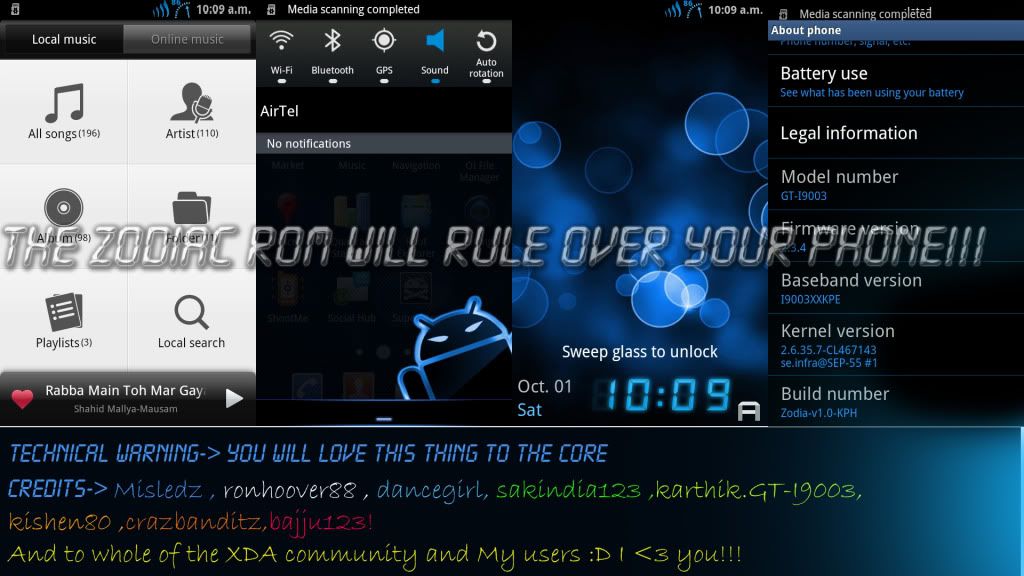
[KPH][ROM][V1.1.3][NEW]Zodiac!

Date released September 29, 2011
credits to bangalorerohan
Custom Rom only for Gingerbread XXKPH


Zodiac! Have a try of it! If you like it...It will be a pleasure! If you don't, I am really very sorry!

Coming to the point:

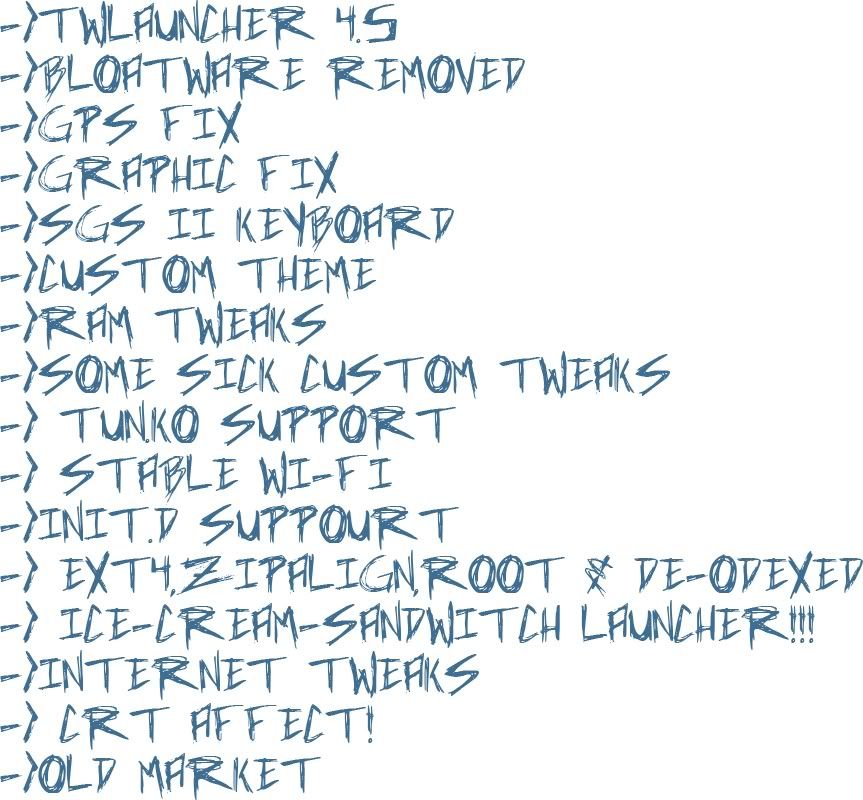
       What's inside this rom?


Installation Procedure:

V1.1- Changed the update-script
-Removed overscroll glow [Coming in 1.2]
-Added new transperant lockscreen
-Added youtube as user-deletable app
v1.1.3->


-> Added a new and simple theme to swiften the UI
-> Added suppourt for sanim.zip
->Music player added
->Browser added
->Fixed launch time for some users
->Added CRT effect
->Build.prop tweaked!
->Added tweaked s2 keyboard for no lag!
V1.1.4-> Added proper working 5lock Screen Mod
-> Blue overscroll Glow
-> CRT effect
->Extended Power Menu
-> Tweaked the dialer to avoid FCs


Screenshots:


V1.1-> Multiupload (139 MB)
V1.1(hotfix)->Multiupload(4 MB)
V1.1.3-> Multiupload (6 MB)


[I9003][C-ROM][KPH]CRANIUM_V3.0 + LiteVersion-Smart.Stable.And"LABEl-led"!

Release Date (September 5,2011)
Credits to sakindia123
For Gingerbread XXKPH only

The Motive of this rom is not to set benchmark records............but rather better user experience!

Even though i no longer have this device.....i love i9003 and i am doing this for the thrill
This rom is not of much of my work....rather it a compilation

Disclaimer:
* Your warranty is now void. * * I am not responsible for bricked devices, dead SD cards, * thermonuclear war, or you getting fired because the alarm app failed. Please * do some research if you have any concerns about features included in this ROM * before flashing it! YOU are choosing to make these modifications, and if * you point the finger at me for messing up your device, I will laugh at you.


Features:

*Based on XXKPH
*Better GPS
*Better vm management and removed journalism
*Some kernel and scaling cpu tweaks
*Clean and minimalistic,removed most of the bloatware and added useful apps
*Build.prop tweaks(also added new flags)
*Very Battery efficient
*All that usual stuff like EXT4,zipalign,root and deodex(Credits to Skin 1980 and Koush)
*Transparent apps(some){later}
*Added tun.ko,Module loader
*Google's Dns Servers and Sqlite 3
*Themed swype lordxx666+Any Soft Keyboard
*Png Optimized Apk's(in progress-causes lot of fc's)
*init.d support with custom script and ply's loopy smoothness script
*Stock Gb launcher(+Miui launcher in next release)
*Removed bootanimation for faster boot,custom sounds.(Some sounds from blaqkarma rom)
{disabled bootanimation,but u can renable it ..)
*3D Fix by ganaboy
* Clear GlassSl theme by kkrraazzyy Link
*Better Ram Management(Thanks lpy and Skin)
*Cyanogen Mod Fonts,Old market
*added miui music,antutu,quadrant,many other widgets,edt tweaks and dsp manager ,and Polaris Office from SGS2
*Internet Tweaks(better wifi+3g+edge+gprs)
* Better Touch Response and scrolling
*And many other things...i am too lazy too write
*Refer to changelogs for more accurate features!

To be done:New Tweaks as they come by and lots of scripts and tweaks i hav in mind


here are the video of each version.. thanks to shriomman for the upload.

                                            v1.0
v1.1
v2.2
v3.0

Special Thanks to kishen80 for seriously and patiently trying every beta version and suggesting
People's participation would help in making this rom better!


Changelog V1.1

[B]*Theme:Concept Galaxy Blue by Jooode
[B]*Htc sense live wallpaper
[B]*Replaced GB launcher with Modded Adw Launcher
[B]*Added MIUI Music
[B]*Graphics Tweak + Some other tweaks
[B]*3d fix by ganaboy
[B]*Scripts Now functiong!See attached file
[B]*Camera Now works under 15% battery(thanks to hayaku)
[B]*Added MIUI Launcher
[B]*Fixed CSC

Changelogs v2.0
*All features of V1 and V1.1
*GPS Working properly
*Many more tweaks
*Removed Custom script and ply's smoothness script as it was causing root bug(will surely add later as an update)
*Added Juwe's Ramscript
*Added some apps(and some transparent apps like gmail,gtalk,facebook etc.
*Is Blazing fast! :P

Changelogs V2.1
[PS-benchmark scores will reduce,but performance will increase,and faster boot!]
*Added Tw 4.5 launcher
*Removed Warez..?
*Added S.A.S v7
[this reduces benchmark scores but performance increases..]

Changelogs v2.2
*Missing apps will now be visible.
*Better GPS Lock
*Added sanim.zip support
*Mentioned Bugs(by users) fixed
*Re-added TwWallpaperChooser.apk
*Removed Golauncher
*Re-added Loopy script by lpy
*Theme Changed to Label by tarunagg
*I think i removed all Warez(it was in the theme pack,not my fault)
*Added Juwe's Ramscript which wasn't there in v2.1
*Replaced Irritating sounds with stock compressed ogg's
*added snsaccount.apk and another app
*Removed Miui launcher and moboplayer as they werent working
*rest i forgot

Changelogs v2.2(Hotfix)(1.85 MB)
*Added ES File Explorer
*Removed Loopy Smoothness Tweak
*Deleted anysoft Keyboard
*VPN Fixed

Changelogs v3.0(152 MB)
*Added some Cyanogen Mod scripts and other misc. scripts
*Better battery backup,higher benchmark scores and faster
*Changed Icons of few apps(iPhone-ish icons !)
*Added AOSP file manager,calculator and calendar
*Highly compressed(Just 152 MB!)
*Other misc. tweaks i have forgotten about!

CHANGELOGS SUPER LITE VERSION(Special Credits to kishen80 for compiling)
workarounds!! and also for the video
> remove many apps just 134mb.
> added Universal Adrenaline Shot v7.5 (These tweaks were not made to improve quad scores but REAL time use with your android)
whats in the tweaks :-changed partition mounts--- for less data corruption
patched sqlite's----IMPROVES I/O
-IMPROVES SCROLLING/RESPONSIVENESS
All new init.d files---PARTITION MOUNTS,SYSCTL,KERNEL
Sysctl.conf----TWEAKS KERNEL AND I/O SCHEDULER
> new TOXIC DARK theme by kkrraazzyy.
> remove some sound(charging)


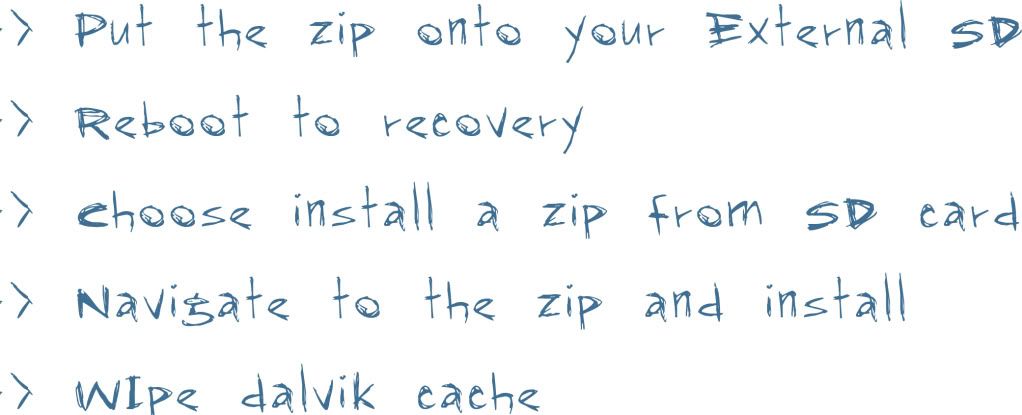
How to Install?

BEFORE FLASHING MAKE A NANDROID BACKUP USING CWM RECOVERY

1. FLASH WITH STOCK XXKPH WITH ODIN
2. FLASH WITH CWM RECOVERY AND CFROOT
3. COPY THE ROM IN YOUR EXTERNAL_SD
4. FLASH THE ROM USING CLOCKWORK MOD
5. AFTER FLASHING JUST WIPE DALVIK CACHE

TO install v1.0,download only that file and install
To install v1.1,first install v1.0,and then install v1.1
TO install v2.0,download only that file and install(no need previous versions)
TO install v2.1,download only that file and install(no need previous versions)
TO install v2.2,download only that file and install(no need previous versions)
To install v2.2(hotfix),first install v2.2,and then install v2.2(hotfix)
TO install v3.0,download only that file and install(no need previous versions)
To install super lite version,no need for previous versions,just install this one


Download:
V1.0(154.4 MB)
v1.1(62 MB)

V2.0(163 MB)
V2.1(160 MB)(thanks to kishen80)
V2.2(160 MB)[Special thanks to kishen80 for providing META-INF!]
Update_V2.2(hotfix)(1.85 MB)
V3.0(152 MB)Special thanks to kishen80 for making it boot!
MIRROR()By kishen80

SUPER LITE VERSION(134 MB)


ADDON DOWNLOAD:

Thursday, September 29, 2011

Poseidon ROM(Beta) by blaqkarma

Release Date - August 30,2011
Open Beta Version
FOR XXKPH ONLY


more SPEED,more EFFICIENT,more RAM,more BATTERY LIFe.and now GPS is WORKING PERFECTLY...mean It will ROCK UR PHONE


Main Features:

-GINGERBREAD XXKPH BASED
-ROOTED
-BUSYBOX INSTALLED
-DEODEXED
-ZIPALLIGNED
-EXT4 CONVERT
-REDUCED BATTERY DRAIN
-ENHANCE GPS

-TWLAUNCHER
-MINIMALIST THEME
-EXTENDED POWER MENU
-CRT/OVERSHOOT GLOW
-5LOCKSCREEN
-CUSTOM BOOT/SHUTDOWN
-CUSTOM SOUNDS
-GINGERBREAD KEYBOARD
-THEMED SWYPE

-ENHANCED RAM MANAGEMENT
-ENHANCED BOOTTIME
-ENHANCED UI RESPONSE
-DECREASED BATTERY DRAIN
-TUN.KO FOR OPENVPN


-REMOVE SOME SYSTEM APPS:

-SOME ADDED APPS:

-AND SOME MORE I'LL JUST PUT CHANGELOG BEFORE THE NEXT RELEASE.


SCREENSHOTS:


INSTALLATION PROCESS:
NOTE:THIS IS FOR XXKPH GINGERBREAD ONLY IF YOU ARE ON OTHER ROM YOU MUST FOLLOW INSTRUCTION 1.

(IF YOUR ON XXKPH OR OTHER CUSTOM ROM YOU ARE REQUIRED TO FACTORY RESET,WIPE CACHE PARTITION AND WIPE DALVIK CACHE AFTER INSTALLATION)


1. FLASH STOCK GB XXKPE THEN FLASH XXKPH

2.FLASH CWM BY SKIN1980 


3.COPY POSEIDON(BETA).zip TO EXTERNAL SDCARD

4.INSTALL POSEIDON(BETA).zip USING CWM

5. ENJOY.!


DOWNLOAD

http://oron.com/kjarvdpehl3t -204.8mb

Clockwork Mod and CF-Root for Samsung i9003 Galaxy SL

First of all... Thanks Chainfire!!!! This is totally based on your work.... Skin1980 made only some MOD....


What is clockworkmod?
  -Clockwork Mod is a modification of recovery console that gives you some extra ability:

1. You can make foll backup of your phone. and restore it even if your phone is soft bricked (but you can go into recovery console).
2. You can apply unsigned update.zip files that created by other developers to easy apply some mods or themes. Also you can even don't rename that file to "update.zip", just place it in some directory of your external sd card and use "install zip from sd card" option.
3. you can create access to your external sd card from PC even if your phone in the recovery menu


Features:
- Added EXT4 filesystem support for the kernel ( now you can convert to ext4 to improve performanca);
- CWM with double RFS / EXT4 filesystem support;
- Busybox;
- Juwe11 RamScript from http://forum.xda-developers.com/show....php?t=1111145


What is CF-Root?
-is a combination of CWM and other tweaks.
the tweaks that included are:
           - CWM
           - ROOT
         - Busybox 1.17.2;
           - Sqlite3 v3.7.2;
           - init.d support (you can put in the folder /system/etc/init.d all the script that you want to be loaded at the startup);
          - New fixed CWM ( unyaffs issue has been fixed - offline charge fixed - USB storage mode while in CWM fixed);
          - Add EXT4 support to the phone ( so you can convert the filesystem to ext4 to improve performance);
         - full working CWM Manager (backup - restore - delete backup - install apk - flash update.zip - flash  kernel - reboot to CWM);
        - Tweaks Manager with various tweak ( Ram Min Free - SD Speed - I/O Scheduler - Kernel Scheduler - CPU Conservative Governor - Swappiness - Ram Script by Juwe11 - Media Stagefright)---        > Many people asked for Juwe Ram Script ---> to enable it completely choose in the Tweaks Manager: Ram Script - Ram Min Free and Swappiness;
        - Auto ZIP-Align on boot - You can choose it in the tweaks app(NEW)
        - Reviewed tweaks values (some from darky's rom some from hardcore some from other post in XDA)( thanks to bigeyes0x0 and Misledz )(NEW)
        - Custom Boot-Animation support (place your custom bootanimation in /system/media/ and call it sanim.zip)(NEW)


How to Flash CWM and CF-root?

- you can flash it via odin
- you need to have appropriate CWM or CF-Root that match to your firmware.
- just put your phone into download mode and put the CWM or CF-Root to PDA
- then flash and wait till it reboots.


ClockworkMod by Skin1980

This is the full-functional CWM recovery ported by me for the Samsung GT-I9003. Here some screenshot:


LINK:

http://www.megaupload.com/?d=0BFPGS12 GT-I9003_PDA-DDKB2.tar
http://www.megaupload.com/?d=5VB0U4IR GT-I9003_PDA-DXKB2.tar
http://www.megaupload.com/?d=8SUXXIYA GT-I9003_PDA-LUBKB1.tar
http://www.megaupload.com/?d=A9Y5Y9FB GT-I9003_PDA-XXKB1.tar
http://www.megaupload.com/?d=BQ2P35CY GT-I9003_PDA-ZHKC1.tar
http://www.megaupload.com/?d=J45I2CH1 GT-I9003_PDA-XXKC1.tar
http://www.megaupload.com/?d=JRJXED7S GT-I9003_PDA-ZCKC1.tar
http://www.megaupload.com/?d=OY7ZTA8L GT-I9003_PDA-XXKB3.tar
http://www.megaupload.com/?d=SNSPPHTW GT-I9003_PDA-JPKE1.tar
http://www.megaupload.com/?d=SUK5ROFE GT-I9003_PDA-DXKE1.tar
http://www.megaupload.com/?d=VKCIF6A0 GT-I9003_PDA-XWKB1.tar
http://www.megaupload.com/?d=Q62RT5Q0 GT-I9003_PDA-DDKF1.TAR
http://www.megaupload.com/?d=R8OC916M GT-I9003_PDA-XXKPE.tar
http://www.megaupload.com/?d=B7JCW9SV GT-I9003_PDA-JVKD1.tar
http://www.megaupload.com/?d=ZIF7XUOB GT-I9003_PDA-XXKPH.tar


CF-Root by Skin1980


CF-ROOT-XXKPH-05.09.2011.tar

CF-ROOT-JPKP5-05.09.2011.tar


thanks to skin1980 and falex007
from xda developers

Clockwork Mod and CF-Root for Samsung i9003 Galaxy SL

      First of all... Thanks Chainfire!!!! This is totally based on your work.... Skin1980 made only some MOD.... 


What is clockworkmod?
  -Clockwork Mod is a modification of recovery console that gives you some extra ability:
1. You can make foll backup of your phone. and restore it even if your phone is soft bricked (but you can go into recovery console).
2. You can apply unsigned update.zip files that created by other developers to easy apply some mods or themes. Also you can even don't rename that file to "update.zip", just place it in some directory of your external sd card and use "install zip from sd card" option.
3. you can create access to your external sd card from PC even if your phone in the recovery menu

Features:
- Added EXT4 filesystem support for the kernel ( now you can convert to ext4 to improve performanca);
- CWM with double RFS / EXT4 filesystem support;
- Busybox;
- Juwe11 RamScript from http://forum.xda-developers.com/showthread.php?t=1111145

What is CF-Root?
  -is a combination of CWM and other tweaks.
      the tweaks that included are:
         - CWM
         - ROOT
         - Busybox 1.17.2;
           - Sqlite3 v3.7.2;
           - init.d support (you can put in the folder /system/etc/init.d all the script that you             want to be loaded at the startup);
           - New fixed CWM ( unyaffs issue has been fixed - offline charge fixed - USB storage    mode while in CWM fixed);
           - Add EXT4 support to the phone ( so you can convert the filesystem to ext4 to improve performance);
           - full working CWM Manager (backup - restore - delete backup - install apk - flash update.zip - flash kernel - reboot to CWM);
           - Tweaks Manager with various tweak ( Ram Min Free - SD Speed - I/O Scheduler - Kernel Scheduler - CPU Conservative Governor - Swappiness - Ram Script by Juwe11 - Media Stagefright)---> Many people asked for Juwe Ram Script ---> to enable it completely choose in the Tweaks Manager: Ram Script - Ram Min Free and Swappiness;
           - Auto ZIP-Align on boot - You can choose it in the tweaks app(NEW)
           - Reviewed tweaks values (some from darky's rom some from hardcore some from other post in XDA)( thanks to bigeyes0x0 and Misledz )(NEW)
           - Custom Boot-Animation support (place your custom bootanimation in /system/media/ and call it sanim.zip)(NEW)


How to Flash CWM and CF-root?
  - you can flash it via odin
  - you need to have appropriate CWM or CF-Root that match to your firmware.
  - just put your phone into download mode and put the CWM or CF-Root to PDA
  - then flash and wait till it reboots.


ClockworkMod by Skin1980

This is the full-functional CWM recovery ported by me for the Samsung GT-I9003. Here some screenshot:

LINK:

http://www.megaupload.com/?d=0BFPGS12 GT-I9003_PDA-DDKB2.tar
http://www.megaupload.com/?d=5VB0U4IR GT-I9003_PDA-DXKB2.tar
http://www.megaupload.com/?d=8SUXXIYA GT-I9003_PDA-LUBKB1.tar
http://www.megaupload.com/?d=A9Y5Y9FB GT-I9003_PDA-XXKB1.tar
http://www.megaupload.com/?d=BQ2P35CY GT-I9003_PDA-ZHKC1.tar
http://www.megaupload.com/?d=J45I2CH1 GT-I9003_PDA-XXKC1.tar
http://www.megaupload.com/?d=JRJXED7S GT-I9003_PDA-ZCKC1.tar
http://www.megaupload.com/?d=OY7ZTA8L GT-I9003_PDA-XXKB3.tar
http://www.megaupload.com/?d=SNSPPHTW GT-I9003_PDA-JPKE1.tar
http://www.megaupload.com/?d=SUK5ROFE GT-I9003_PDA-DXKE1.tar
http://www.megaupload.com/?d=VKCIF6A0 GT-I9003_PDA-XWKB1.tar
http://www.megaupload.com/?d=Q62RT5Q0 GT-I9003_PDA-DDKF1.TAR
http://www.megaupload.com/?d=R8OC916M GT-I9003_PDA-XXKPE.tar
http://www.megaupload.com/?d=B7JCW9SV GT-I9003_PDA-JVKD1.tar
http://www.megaupload.com/?d=ZIF7XUOB GT-I9003_PDA-XXKPH.tar


CF-Root by Skin1980


Related Posts Plugin for WordPress, Blogger...
Twitter Facebook Digg Favorites More

 
Twitter Bird Gadget
Home Samsung i9003 Galaxy SL | Stock ROM mjBridiZon - Custom ROM | Credits